

Introducing MCP Tracey: AI Assistants Meet XDC Blockchain - We Need Your Feedback!
TL;DR
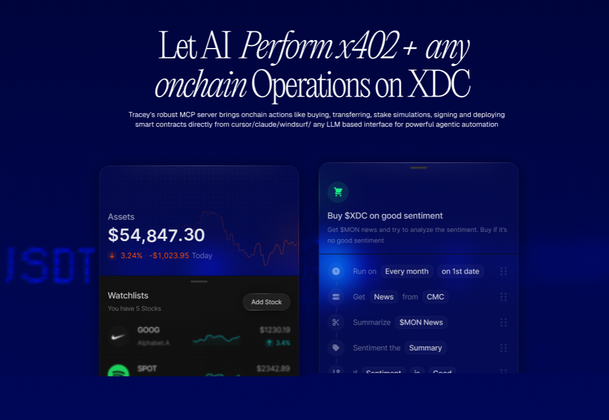
We've built MCP Tracey, a bridge that connects AI assistants (like Claude, ChatGPT) directly to the XDC Network. Imagine asking your AI assistant to "check my XDC balance," "send 10 XDC to this address," or "show me my token portfolio" - and it actually does it, securely and seamlessly. We're seeking community feedback before a wider release.
🌟 What is MCP Tracey?
MCP Tracey is a Model Context Protocol (MCP) server that gives AI assistants native capabilities to interact with the XDC blockchain. Built on Anthropic's MCP standard, it transforms AI assistants from simple chatbots into powerful blockchain tools that can:
- Query wallet balances and transaction histories
- Check real-time XDC prices and gas fees
- Monitor transaction status on the network
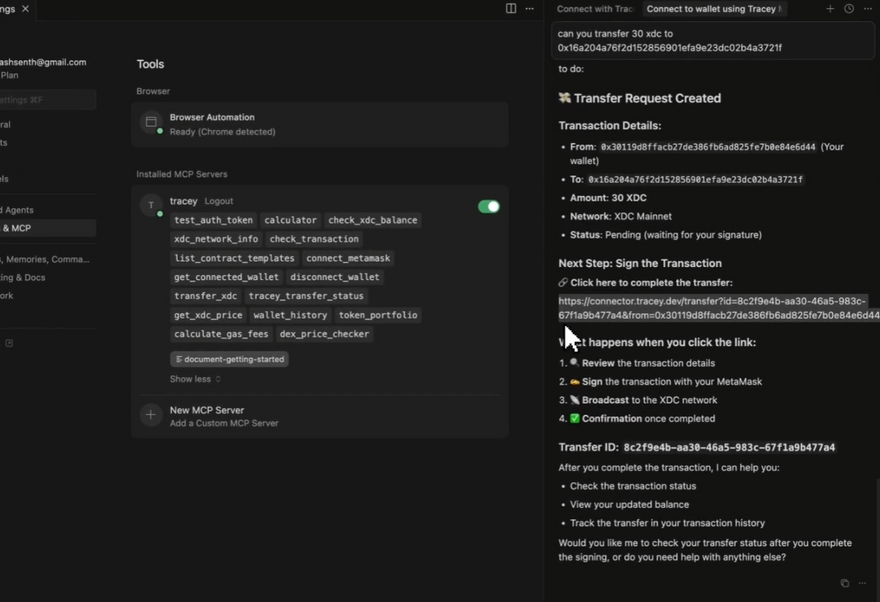
- Transfer XDC tokens securely (with MetaMask signing)
- Analyze complete token portfolios
- Access DEX price data across XDC exchanges
Think of it as giving your AI assistant a direct phone line to the XDC Network - but with enterprise-grade security and user control.
🎯 Why This Matters for XDC
1. Developer Experience Revolution
Instead of writing custom scripts or using multiple tools, developers can simply ask:
"What's the gas fee for deploying a contract on XDC right now?"
"Show me the last 10 transactions for xdc123...abc"
"Transfer 50 XDC to the treasury wallet"
The AI handles the RPC calls, formats the data, and even helps debug issues.
2. Lowering the Barrier to Entry
New developers don't need to memorize Web3.js commands or ethers.js syntax. Natural language becomes the interface. This could dramatically accelerate XDC adoption among developers new to blockchain.
3. 24/7 Blockchain Assistant
Imagine having an AI assistant that:
- Monitors your wallet and alerts you to unusual activity
- Helps you understand gas optimization strategies
- Explains transaction failures in plain English
- Suggests optimal transaction times based on network congestion
4. Enterprise Integration Potential
Companies can integrate XDC blockchain capabilities into their existing AI workflows without building custom infrastructure from scratch.
🔧 Technical Architecture
Core Components
17 Blockchain Tools organized into three categories:
🔓 Public Tools (No Auth Required)
- Network information and statistics
- Transaction status checking
- XDC price feeds (multi-currency)
- Gas fee calculations
- DEX price comparisons
- Smart contract templates
🔐 Authenticated Tools
- Secure XDC transfers via JWT + MetaMask
- Transfer history tracking
- Wallet connection management
- Token validation and debugging
⚡ Flexible Tools
- Balance checking (public or authenticated)
- Transaction history (public or authenticated)
- Token portfolio analysis (public or authenticated)
Security-First Design
┌─────────────────┐
│   AI Assistant  │
│  (Claude/GPT)   │
└────────┬────────┘
         │ MCP Protocol (SSE)
         ↓
┌─────────────────┐
│  MCP Tracey     │
│  (Middleware)   │
└────────┬────────┘
         │
    ┌────┴────┐
    ↓         ↓
┌────────┐ ┌──────────┐
│  XDC   │ │ MetaMask │
│  RPC   │ │ (Signing)│
└────────┘ └──────────┘
Key Security Features:
- ✅ Zero private key storage - all signing happens client-side in MetaMask
- ✅ JWT authentication - time-limited tokens verify user identity
- ✅ Session isolation - concurrent users can't interfere with each other
- ✅ Client-side transaction approval - users must explicitly approve every transfer in MetaMask
- ✅ Audit trail - optional Supabase integration tracks transfer requests
💡 Real-World Use Cases
For Developers
User: "Check if my transaction 0xabc...123 succeeded"
AI: Queries XDC Network → Returns status, gas used, block number, explorer link
For DeFi Users
User: "What's the price of WXDC on different DEXs?"
AI: Compares prices across XDC exchanges → Highlights best rates
For Portfolio Management
User: "Show me my complete token holdings"
AI: Scans wallet → Returns XDC balance + all XRC20 tokens with values
For Treasury Operations
User: "Transfer 100 XDC to the development fund wallet"
AI: Creates transfer request → Opens MetaMask for signature → Confirms on-chain
🚧 What We Need From You
Current Status: ✅ Fully functional with 17 tools, SSE transport, JWT auth, MetaMask integration, and multi-client support
Key Feedback Areas
1. Feature Priorities - Contract deployment? Token swaps? NFT support? Multi-chain?
2. Developer Experience - Is the auth flow intuitive? Need more docs?
3. Security & Trust - Additional security measures needed? Production-ready concerns?
4. Use Cases - What blockchain interactions are we missing? Personal or enterprise use?
5. Integration - Other AI platforms to support? IDE plugins needed?
6. Ecosystem - XDC-exclusive or EVM-compatible? dApp partnerships?
🧪 Try It Yourself
30-Second Setup (No Code Required!)
The Tracey MCP server is hosted and ready to use - no installation needed! Just connect your AI assistant and start querying the XDC blockchain.
For Claude Users
- Go to Claude Settings → Connectors → Add custom connector
- Add the following:
-
Name:
Tracey XDC -
URL:
https://mcp.tracey.dev/sse
-
Name:
- Click Add
- Test it: Ask "What XDC blockchain tools do you have?"
For Cursor Users
Quick Install: Click the button below to automatically install
🔗 Install Tracey MCP in Cursor
Manual Setup:
- Press
Cmd+Shift+P(Mac) orCtrl+Shift+P(Windows) - Search for "Open MCP settings"
- Add to
mcp.json:
{
  "mcpServers": {
    "tracey-xdc": {
      "url": "https://mcp.tracey.dev/sse"
    }
  }
}
- Test: Ask "Check current XDC price"
For Windsurf Users
- Open Windsurf IDE
- Go to Settings → Tools → Windsurf Settings
- Click Add Server or View Raw Config
- Add to
mcp_config.json:
{
  "mcpServers": {
    "tracey-mcp": {
      "url": "https://mcp.tracey.dev/sse"
    }
  }
}
- Save and restart
First Commands to Try
Once connected, try these commands in your AI assistant:
1. Check XDC Price
"What's the current XDC price in USD?"
Expected: Real-time price with 24h change and market data
2. Network Status
"Show me XDC network information"
Expected: Network stats, validators, current block info
3. Market Analysis
"Find arbitrage opportunities on XDC DEXs"
Expected: Real arbitrage opportunities with profit calculations
4. Check Any Wallet
"Check balance for xdc123...abc"
Expected: XDC balance and portfolio overview
5. Latest News
"Get the latest XDC and DeFi news"
Expected: Recent crypto news from multiple sources
Authentication (Optional - For Advanced Features)
To use transfer and portfolio features with your own wallet:
-
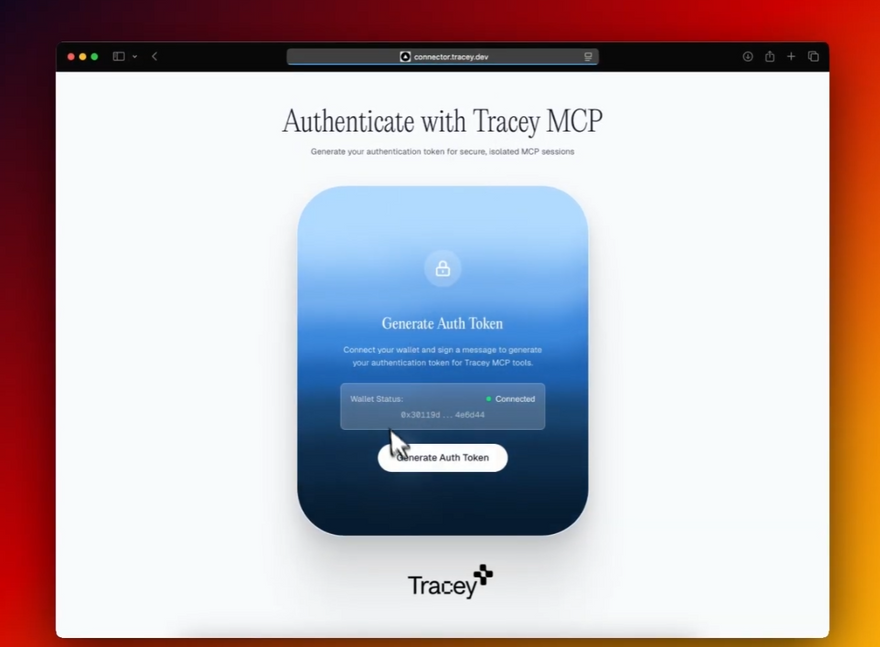
Get Your Auth Token
- Visit: https://connector.tracey.dev/auth
- Connect MetaMask and complete authentication
- Copy your JWT token
Use in Commands
"Check my portfolio with auth_token='your-token-here'"
"Transfer 10 XDC to xdc456...def with auth_token='your-token-here'"
Benefits of Authentication:
- Check your own wallet balances automatically
- Send XDC transfers with MetaMask signing
- Track your transaction history
- Access personalized portfolio analytics
Complete Documentation
- Official Docs: https://tracey.dev/docs
- Quick Start Guide: https://tracey.dev/docs/quick-start
- Setup Guide: https://tracey.dev/docs/setup
- Troubleshooting: https://tracey.dev/docs/troubleshooting
🤝 How to Provide Feedback
We're looking for honest, constructive feedback from the XDC community. Here's how you can help:
1. Comment Below
Share your thoughts directly in the comments:
- Feature requests
- Security concerns
- Use case ideas
- Integration suggestions
2. GitHub Discussions
For deeper technical discussions:
- Open issues for bugs or feature requests
- Submit PRs for contributions
3. Community Channels
Join the conversation:
- Twitter: [@gettraceyai]
4. Private Feedback
For security-sensitive topics:
- Email: [abilash@tracey.dev]
🗺️ Roadmap
Phase 1: ✅ Foundation Complete (17 tools, JWT auth, MetaMask, multi-client)
Phase 2: 📍 Community Feedback (gathering requirements, prioritizing features)
Phase 3: Q1 2025 - Contract deployment, DEX integration, portfolio analytics
Phase 4: Q2 2025 - Apothem testnet, partnerships, developer education
Phase 5: Future - Multi-chain, enterprise features, GraphQL API
Your input will shape this roadmap!
❓ Frequently Asked Questions
Q: Is this production-ready?
A: It's functionally complete and secure, but we're seeking community validation before recommending production use for critical operations.
Q: Does this replace web3.js or ethers.js?
A: No! It's a complementary tool that makes blockchain interactions more accessible via AI. Developers will still use traditional libraries for complex applications.
Q: Can I self-host this?
A: Absolutely. The entire system is designed to run on your own infrastructure. No vendor lock-in.
Q: What about privacy?
A: The server never sees your private keys. All transaction signing happens in your MetaMask. We can make the authentication system even more private based on feedback.
Q: Is there a cost?
A: The open-source version is free forever. If there's demand, we may offer a hosted version with support, but self-hosting will always be an option.
Q: How does this compare to existing blockchain chatbots?
A: Most chatbots just answer questions. MCP Tracey actually executes blockchain operations through a standardized protocol that any AI assistant can use.
Q: What if MCP protocol changes?
A: We're committed to maintaining compatibility. The MCP standard is backed by Anthropic and designed for stability.
Q: What countries is this available in?
A: Tracey MCP is available globally in all countries. As a decentralized blockchain tool, there are no geographic restrictions - anyone with internet access can connect and use it.
🙏 Why Your Feedback Matters
This started as an experiment: Can we make blockchain development as simple as having a conversation? The answer is yes - but how we build it depends on you.
Your feedback determines:
- Whether this solves real problems or just seems clever
- Which features drive adoption vs. nice-to-haves
- How to balance innovation with security
- Where to invest development time
This is a community project - we're building WITH you.
🚀 Next Steps
- Try it - Connect your AI assistant in 30 seconds
- Share feedback - Comment below or join feedback channels
- Spread the word - Tell other XDC developers
- Contribute - PRs welcome!
📝 Final Thoughts
AI + Blockchain could be transformative - but only if we get it right. MCP Tracey is our contribution to this intersection for XDC, but it's incomplete without your input.
Challenge us constructively:
- Where are the security holes?
- What features are missing?
- What problems should this solve?
Let's build something genuinely useful together.
🏷️ Tags
#xdc #finternet #accelerator #blockchain #ai #mcp #developers #feedback #opensource #web3
Author: [Abbilashh Senthilkumar]
GitHub: [@abilashsenth ]
Contact: [abilash@tracey.dev]
Date: December 11, 2025
Special thanks to the XDC Foundation, Anthropic (for the MCP protocol), and the entire XDC developer community for ongoing support and inspiration.
👇 Drop your feedback in the comments below! 👇





Discussion (0)